NewThe WP Tutoring WordPress training platform is live — on demand video courses and interactive WordPress lessons. Free lessons included.Start free
Helping site owners learn WordPress since 2012 · (844) WP-TUTOR
SEO

Yoast's Focus Keyphrase and the Green Light, Explained

What the Yoast focus keyphrase actually does, how the traffic-light analysis works, and why chasing all-green is the wrong goal.

WT
WP Tutoring TeamWordPress Instructors
Updated Aug 12, 2026
2 min read

The green light is Yoast's most famous feature and its most misunderstood. Here's what the focus keyphrase really is, how to choose one, and how to read the analysis like an editor instead of a slot machine. Shot on Yoast under WordPress 7.0, August 2026.

TL;DR The 30-second version
  • The focus keyphrase = the search phrase this post targets. Yoast checks your draft against it.
  • Set it in the Yoast sidebar; the SEO analysis lights update as you write.
  • Fix red lights that are real (keyphrase absent, no meta description).
  • All-green is not the goal — readable, useful content that ranks is.

Setting the keyphrase

Open a post, click the Yoast icon (top right) to open the sidebar, and type your phrase into Focus keyphrase. The SEO analysis and Readability analysis sections update live:
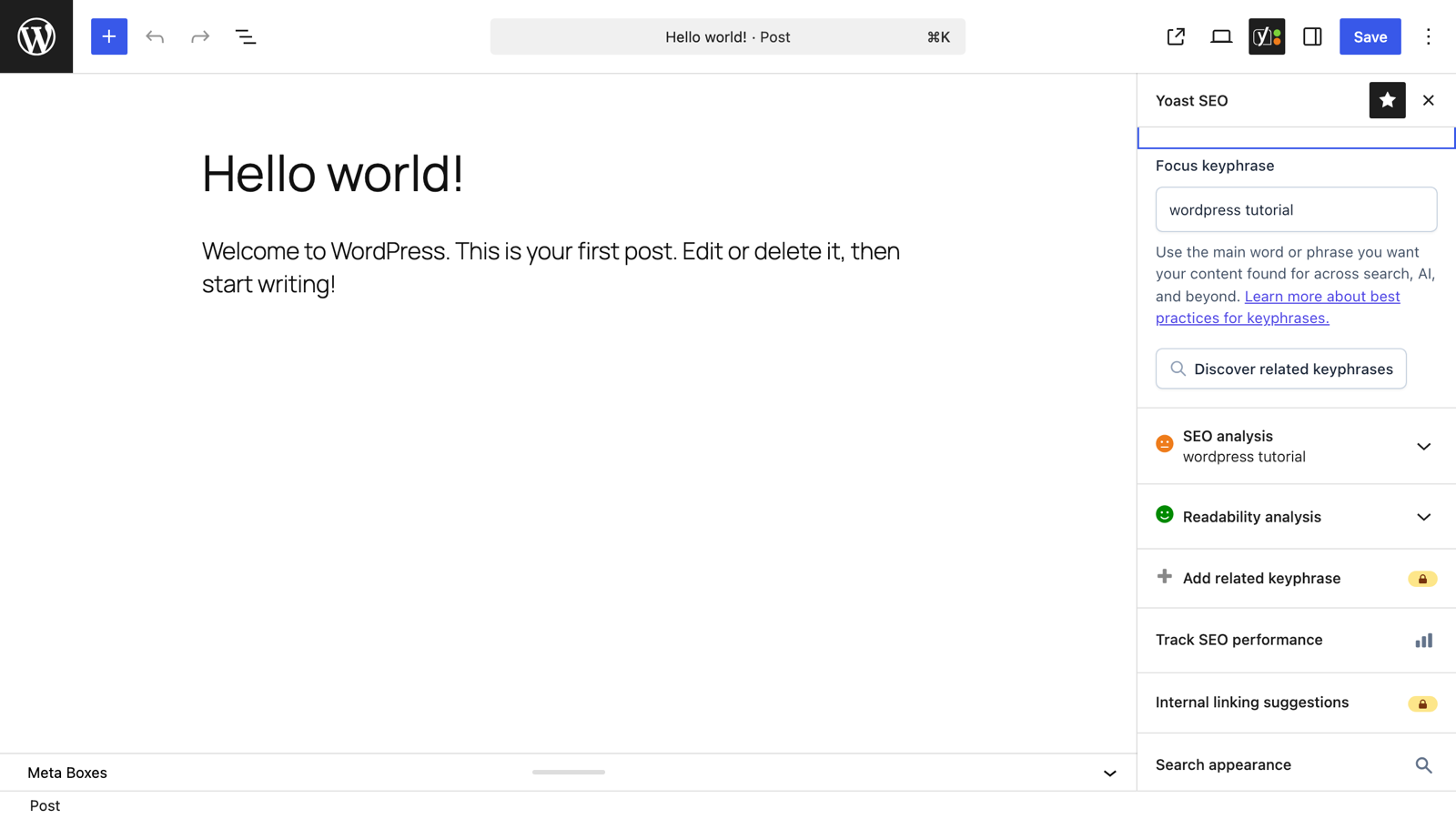
The Yoast sidebar with a focus keyphrase set and analysis lights

Choose the phrase a human would search — specific beats broad. "wordpress tutorial" is a war zone; "wordpress tutorial for real estate agents" is a winnable page.

Reading the lights like an editor

Expand SEO analysis for the itemized checks. Triage them in three buckets:

  1. Fix now — keyphrase missing from the title, first paragraph, or the whole text; no meta description; text too short for the topic. These are real signals.
  2. Fix if natural — keyphrase in a subheading, image alt text, slug. Do them where they read naturally; skip where they'd be forced.
  3. Ignore freely — density complaints on long pieces, exact-match demands that fight your grammar. Write for the reader; Google handles variants fine.

Readability's advice (shorter sentences, more subheadings) is genuinely good for web writing — treat it as a friendly copyeditor, same rules.

One phrase per post

If a post wants two unrelated keyphrases, split it into two posts and link them. Free Yoast enforces this helpfully by allowing one phrase; the "related keyphrase" upsell is rarely the answer — more focused pages are.

The light is not the target

We've reviewed sites with perfect green dots on every post and no traffic — and messy orange posts that dominate their niche. The analysis checks mechanics, not merit. Get the mechanics clean quickly, then spend your time on the content itself.
Keep learning

Frequently asked questions

What should I put as my focus keyphrase?
The search phrase a person would type to find this exact post — usually 2–5 words ("wordpress shipping zones", not "shipping"). One post, one phrase; if you're targeting two distinct phrases, that's usually two posts.
Does Google see the Yoast focus keyphrase?
No. It's purely Yoast's internal target for analyzing your draft. Google sees the resulting title, headings, and content — the keyphrase box just tells Yoast what to check them against.
Do I need every light green?
No — the analysis is a spellchecker for SEO, not a judge. Fix reds that represent real problems (missing meta description, keyphrase nowhere in the text), and ignore suggestions that would make the writing worse. Plenty of #1 results are orange.
WT

WP Tutoring Team

WordPress Instructors

We’ve been teaching WordPress to individuals and businesses since 2013 — through step-by-step tutorials, video courses, and 1-on-1 tutoring sessions.

Leave a comment

Comments are reviewed before they appear.

Get our free WordPress starter guide

Join thousands of site owners and get step-by-step WordPress tutorials in your inbox, plus printable cheat sheets.

Beginner-friendly, no jargon
Printable cheat sheets & checklists
Unsubscribe anytime

Request your session

We’ll reply quickly — usually the same business day.

By using this form you agree with the storage and handling of your data by this site.

Access our WordPress Training Academy videos

Step-by-step video courses covering the block editor, themes, plugins, and everything you need to build a site you’re proud of. Free lessons included — browse the full library before you sign up for anything.

Explore the Academy