Helping site owners learn WordPress since 2012 · (844) WP-TUTOR
WordPress Basics

Setting WordPress Starting day of the Week

Learn how to change the starting day of the week in WordPress under Settings > General so your calendars and widgets match your local convention.

WT
WP Tutoring TeamWordPress Instructors
Updated May 14, 2016
1 min read

The starting day of the week is not the same in all countries. So we need to change that to match our local system. Follow the steps bellow to set up the starting day of your site:

Setting WordPress Starting day of the Week

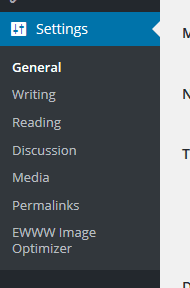
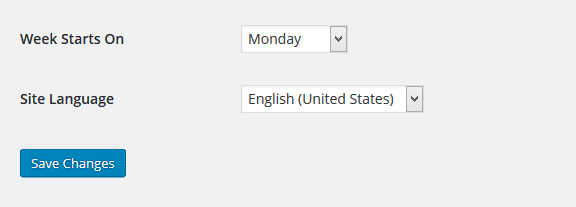
STEP 1 : To set up the starting day, go to Settings > General menu in the WordPress Dashboard. Setting WordPress Starting day of the Week STEP 2 : Scroll down and you'll see Week Starts On dropdown option where you can select the starting day of the week. WordPress Tutorial - Setting WordPress Starting day of the Week STEP 3 : Click Save Changes to save the week starting day. Add new page

WT

WP Tutoring Team

WordPress Instructors

We’ve been teaching WordPress to individuals and businesses since 2013 — through step-by-step tutorials and 1-on-1 tutoring sessions.

Leave a comment

Comments are reviewed before they appear.

Get our free WordPress starter guide

Join thousands of site owners and get step-by-step WordPress tutorials in your inbox, plus printable cheat sheets.

Beginner-friendly, no jargon
Printable cheat sheets & checklists
Unsubscribe anytime

Request your session

We’ll reply quickly — usually the same business day.

By using this form you agree with the storage and handling of your data by this site.


