Table of contents
Adding Categories in WordPress helps you group posts together and it also helps people find your content. It is the cornerstone of good content organization.
WordPress Tutorial Video - How to Add Categories in WordPress
Step 1 - Create the Category in the Post Menu Link
Depending on your theme that you are using categories can be displayed at the top or bottom of the post On your Left side bar menu you will see posts and under it you will see categories
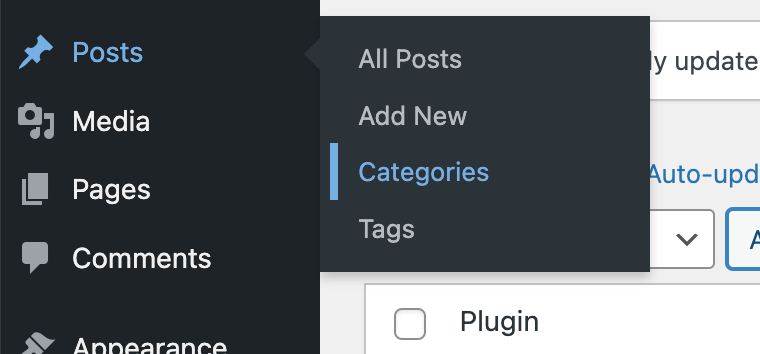
Hover over posts in the WordPress Dashboard and choose Categories
STEP 2 Add information for the category
After clicking on Categories you will be able to enter the name and description for the category

Category Page
STEP 3 Assign the WordPress Post to a Category
In the Block Editor screen, choose the Post tab in the block sidebar. After you scroll down, you'll see the category you created in the Categories dropdown. Choose the correct post category and click update in order to update your post.

STEP 4 - If the category isn't showing in the list, click "Add New Category"
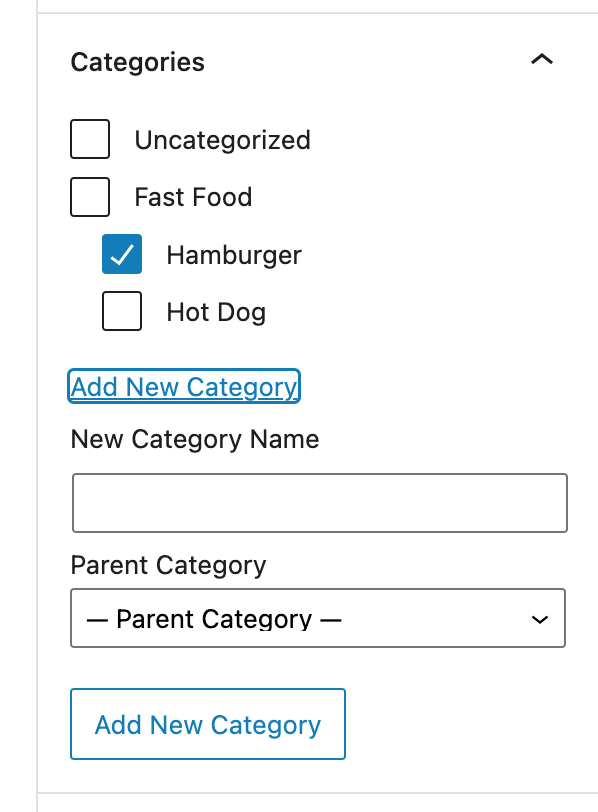
Type your new category into the "New Category Name" box. Click the "Add New Category" button.



Leave a comment